In today’s world, life without a computer is hard to imagine. We use this miracle of technology not only to stay informed and connected, but for most of us — it’s a central tool in our everyday work.
To help speed things up, Windows offers so-called keyboard shortcuts. With just a few key combinations, you can perform complex tasks in seconds — no mouse required. According to research, people who master and consistently use just 15–20 essential shortcuts can cut their computer task time by 10–15%.
That’s nearly 5 extra minutes every hour — time you can spend relaxing, taking a breather, or grabbing a well-deserved cup of coffee. AdmiGram.com has compiled a list of the most useful and frequently used keyboard shortcuts to make your computer experience smoother and more efficient.
Windows Hotkeys That Boost Work Speed
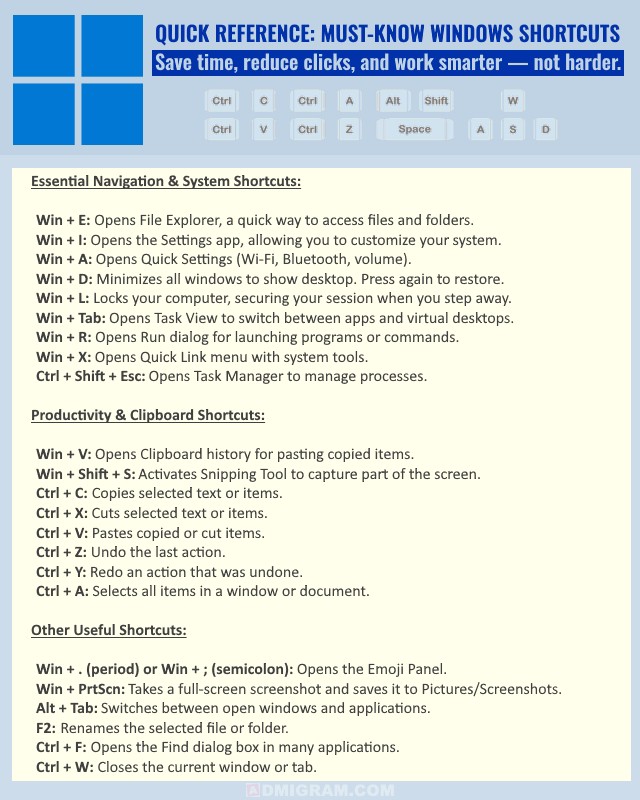
For the Power Users: Advanced Shortcuts to Maximize Productivity
Window & Navigation Shortcuts
Win + ↑ / ↓ — Maximizes or minimizes the current window.
Win + ← / → — Snaps the window to the left or right side of the screen (Snap Assist).
Win + Ctrl + D — Creates a new virtual desktop.
Win + Ctrl + ← / → — Switches between virtual desktops.
Win + Home — Minimizes all windows except the active one (press again to restore).
Alt + F4 — Closes the active window (or brings up the Shut Down menu if on the desktop).
Alt + Enter — Opens the Properties window for the selected file or folder.
File Management & Browsing Shortcuts
Ctrl + Shift + N — Creates a new folder in File Explorer.
Shift + Delete — Permanently deletes selected items (bypasses the Recycle Bin).
Ctrl + Shift + T — Reopens the last closed browser tab.
Ctrl + N — Opens a new window in most apps or browsers.
Ctrl + P — Opens the print dialog for the current page or document.
Display & Screen Utilities
Win + P — Opens the projection menu to switch display modes (for multiple monitors).
Win + Ctrl + Shift + B — Restarts your graphics driver (useful if your screen freezes).
Ctrl + Scroll Wheel — Zooms in and out in browsers, File Explorer, and many apps.
Win + Plus (+) — Opens the Magnifier tool.
Win + Esc — Closes the Magnifier.
Other Handy Shortcuts
Ctrl + D (in browsers) — Bookmarks the current page.
F5 — Refreshes the current page or folder.
Ctrl + Shift + Delete — Opens the browser’s Clear Browsing Data menu.
image on top: Girl with red hat / Unsplash